What it solves
Hindi handwriting takes repetition and feedback. Hindi Dictation gives learners a structured place to write, check and improve without waiting for manual review.
 Available on Google Play
Practice Hindi handwriting using AI handwriting recognition, guided exercises and interactive learning.
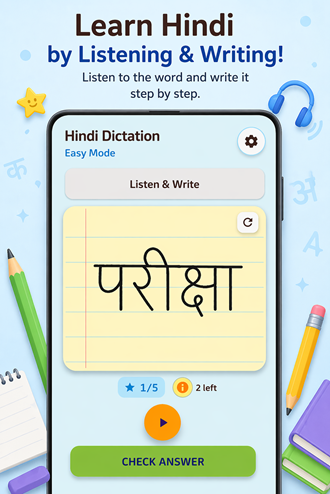
The app preview stays intentionally compact so learners can inspect the UI without a full-width screenshot taking over the page.
Hindi handwriting takes repetition and feedback. Hindi Dictation gives learners a structured place to write, check and improve without waiting for manual review.
Students, parents and self-learners who want a calm Android practice tool for Hindi letters, words and dictation-style exercises.
AI recognition turns handwriting practice into an interactive loop, combining clear exercises with immediate feedback and a polished mobile interface.
Recognizes written Hindi input and helps learners understand progress quickly.
Practice flows are structured for repeatable learning and confidence building.
Daily progress loops keep learning consistent and motivating.
A simple, distraction-light learning experience shaped for students.
Start with a Hindi word or dictation prompt to build listening and writing confidence.
Practice handwriting on-screen with clear guidance and comfortable repetition.
Receive immediate recognition feedback and keep strengthening daily progress.
 Kotlin
 Jetpack Compose
 Google ML Kit
 Material Design
Hindi Dictation is published and available through Google Play.
Hindi Dictation is designed for Android devices and is available through Google Play in supported regions.
Some recognition or store-related capabilities may require connectivity. The app is designed around practical mobile learning sessions.
GoFusion Labs keeps data practices focused on the product experience and support. Contact support for product-specific privacy questions.
Email gofusionlabs@gmail.com with the app name, device details and a short description of the issue.